Thursday, January 31, 2013

nGauge Digital Instrument Display


Application: iPhone, iPad, iPod Touch 5.1 or later
Function: NMEA 2000 Digital Instruments
Cost: $19.99
Rating: ****


I ran a across some great photos of a major fail by these marlin fisherman. The Marlin Magazine Facebook page posted these the other day. Apparently they hooked a big one and were backing down on the fish to reel it in.  The captain backed a little too hard and they took major water over their stern.  The pictures speak for themselves. Note to self, "take it easy on the back down"!


The boat sunk and was a total loss. The embarrassed crew was rescued.

This week I ran across another data display app called nGauge.  Perhaps if the captain of the marlin boat had this he would have known he was backing up a little too fast. 

MFD (multi-function displays) are hot right now. All the major manufacturers are creating multifunction displays capable of presenting just about any NMEA 2000 data that you might have on your yacht.  The NMEA 2000 data can include AIS, Environmental, Navigation, Power, Propulsion, Steering and other general points.

Garmin, Raymarine and others have recently come out with some cutting edge digital marine instrument displays.  I have been tempted to purchase some of  these but I keep asking myself, why would I buy one of these spendy displays only to have it become obsolete in just a few months.  The hardware always seems like the expensive part. Why not use your iPad or iPhone and an app that allows you to create any display that you want.  The app software option sounds a lot cheaper and more versatile.  If a new and cooler app comes out next month I am only out a few bucks rather that hundreds of dollars.

nGauge Features:
  • Customized to suit your network and data sources
  • 60 gauge types available
  • 4 different page layouts
  • Displays NMEA 2000 PGN data
  • NMEA 0183 available in March 2013
  • Create custom pages to include just the gauges you need
  • Set up which pages you want to display
  • Set the order of the displayed pages
  • Day or night viewing of the gauges
  • Set gauge background to white or black
  • US or metric units
  • Tachometers maximum of 4000 or 6000 rpm
  • Speedometers range of 0-10, 0-20 or 0-60 knots
  • Single or dual engine gauges

nGauge was designed to be a configurable instrument display for your portable iPad, iPhone or iPod Touch.  The app can be set up to closely mimic the dedicated marine instruments on your yacht.

Gauges can be customized and arrange in a variety of pages to suit your style.  Several different gauge sizes can be selected and combined to create your desired instrument panel.

The gauges display beautifully on the high resolution screens of the iPad, iPhone or iPod Touch. 

Over 60 gauges are included, and these can be grouped into custom pages to suit the information on your network. Gauges can be viewed in analog with inset digital versions and multiple devices can receive and display the same data.


nGauge at this point reads NMEA 2000 data transmitted over WiFi by the DMK or Chetco SeaSmart adapter.  Other WiFi devices may also work. The data is received from these devices in ad hoc mode, or through a router.

The NMEA 0183 data display capabilities are coming with a new release in March. I am not sure if it will be part of this app or if it will be a completely new app, we will have to wait and see.

Remote monitoring of a boat or land installation is easy to set up too. Weather stations can be connected to a wireless network and are supported with gauges specific to weather information.  nGauge can also be used for land based based weather station monitoring too.

It would be nice to be able to combine the meter pages into groups.   Meters for the engine, GPS, navigation, wind and weather could be grouped in separate pages to be able to access them quicker. Soft keys at the bottom could be added to display the different groups.

An option to have a large segmented digital displays would be another nice option rather that the analog dial looking gauges.

There is a lot of versatility with the page layouts and gauge size selection.  I like the versatility provided to arrange the gauges in a variety of page layouts.  With a few tweaks and the addition of NMEA 0183 this one might be a keeper.

~~~Sail On~~~ /)
Mark

Saturday, January 26, 2013

Boat Show Season

Application: iPhone, iPad
Function: Boat Show events, schedule, tickets and parking info
Cost: Free
Rating: ***


Aah, there is no better place than a boat show to rekindle that dream of going cruising some day.

Boat show seasons seem to happen ever year about this time.  The off season gives boaters the opportunity to check out new models and equipment offered by the manufacturers. Manufacturers flock to these event to show off their latest models and accessories.

There is nothing more fun that wandering the docks checking out the new boats and picking up brochures and promotional swag items from the dealers. I actually start to salivate when I enter a boat show. To me it is better than Christmas.  I just wander around aimlessly for hours checking out the new shiny boats.  Oh, I love the smell of fiberglass in the morning.  The new boat smell give me a natural high that is unexplainable.  You get the picture!

Most of the Florida boat show information can be found on the Show Management Website.  They also have a Boat show App that looks like it might be useful to help you navigate the various shows on their site.

The main splash screen for the app gives a listing of the upcoming Events and past shows so you can keep track of the dates and times.

Soft keys at the bottom help you navigate the app to other pages including a Favorites, News and Connect.

The app does not cover all of the boat shows in the country. It appears to just cover a few of the Florida based events.

Each event has a page with pertinent info for the show. The app is useful in that is will give you a list of some of the upcoming shows.

Detailed event information includes, boats, manufacturers, exhibitors, the event map and a handy street map.

Additional information on the Seminars that will be offered at the show is useful if you want to actually learn something while you are there.

Other useful items include, Bus pickup and drop points, Food a Drink, Restrooms, Emergency services, Show Offices, Sponsors, dates and times.

The app does a pretty good job in giving you a road map of the exhibitors and other show activities. If your looking for a specific boat type or manufacturer, the app will help you search and locate them at the show.

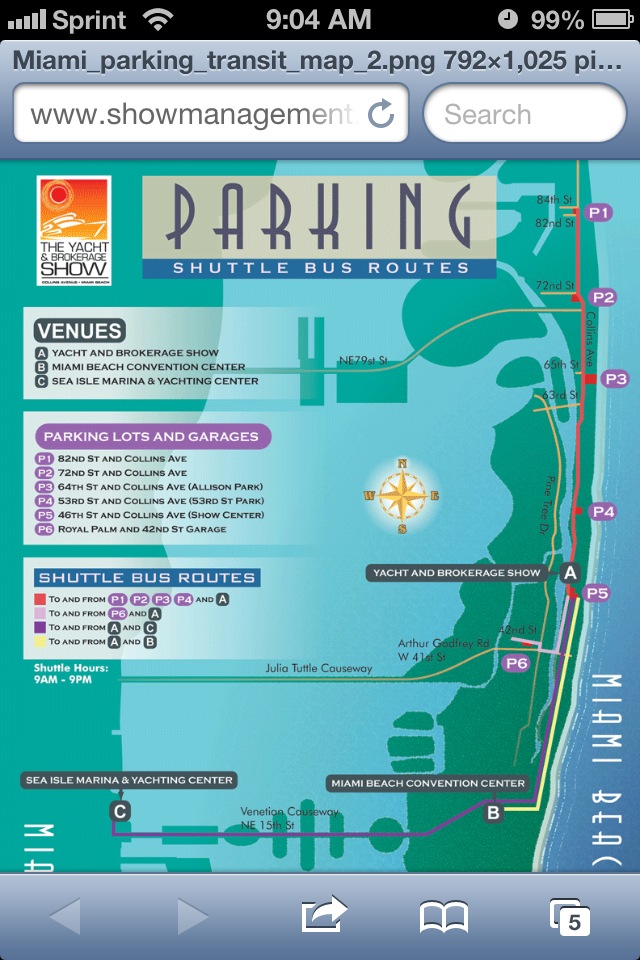
The show schedule and ticket information if provided along with parking and other logistics to get you to the show and help you find what your looking for once you get there.

A handy News page will keep you updated on all the latest breaking new on the boat shows.

There are a ton of press releases on who is going to be at the show and what new products and electronics will be highlighted.

Various vendors hospitality information is updated to let you know where the best parties will be at.

Vendors products news in updated here so you can keep up on the latest gadgets

Additional articles and guides will help make your boat show experience more enjoyable.

Venue maps are provided to help you navigate your way around the shows.

These maps are interactive and allow you to zoom in to see details of the boat show venue.

A complete listing of all the vendors and their locations are provided to help your find what your looking for.

Restaurants, bars, restroom facilities and meeting rooms are marked to enable you to make your boat show visit a fun an enjoyable experience.

I liked the idea of having one app where I could access all the information. I wish all boat shows would create fun usable apps for their shows.


 Here is a list of some of the Boat Shows coming up this winter.

 Miami International Boat Show February 14-18th, 2013.


Palm Beach Boat Show is happening March 21-24th, 2013


Suncoast Boat Show in Sarasota Florida April 19-21st, 2013


Fort Lauderdale International Boat Show October 25-29th, 2012 (Completed)


Houston Boat Show January 4-13th, 2013

Tampa Bay Boat Show March 8-10th, 2013

Trawler Fest January 29-February 2nd, 2013

Southeast Boat Show, Jacksonville, Florida, April 12-14th, 2013

This is by no means a complete list of all the boat shows.  There are literally hundreds of boat and outdoor shows around the country every year.  So, take the family out for a fun day and check out a boat show near your.


~~~Sail On~~~ /)

Mark

Monday, January 21, 2013

iRegatta 3.05.0 adds iPolar Integration


Application: iPad, iPhone
Function: Sailboat Racing Performance, GPS, Start timer
Rating: ****
Cost: $9.99

About a year ago I reviewed iRegatta, which is a tactical racing application for sailing.  The app will work on either your iPhone or iPad, iOS 4.3 or later.  Since then, the developers have added a few features worth talking about.

One of the most interesting is the integration of Polar diagrams that can be created in the iPolar app and then downloaded to iRegatta.

It you are a hard core sailor and want the most out of your yacht, iPolar and iRegatta will give you the tools to track and improve your performance.

The iPolar app was written by KND Sailing Performance.  These guys work with some of the biggest racing syndicates in the world. 

The iPolar app is a great little tool that allows you to create polar diagrams for your yacht and then export them to various programs.

Basically, a polar diagram is the graphical diagram consisting of the theoretical maximum boat speeds at various true wind speeds and headings, along with the associated upwind and downwind VMGs (velocities made good).

Knowing your boats optimum points of sail with respect to the wind can give you an edge in a race or get your across oceans is a shorter amount of time.

To Export the polar diagrams, select the arrow icon in the top right of the iPolar screen. A pop up box will open asking you which program you want to open the file in. Compatible apps will show up on the list.

If you have iRegatta on the same device it will show up on the list. Simply tap the iRegatta icon and it will open up the app and ask you to confirm the import.

In iRegatta, confirm the import and it will show you the imported files.  Here the jib, spinnaker and asymmetrical spinnaker polars are shown as imported.

iRegatta has added additional features to the start sequence page too. Waypoints can easily be created for the two ends of the start line.  Simply tap the ship icon for the committee boat end and tap the flag icon for the other end of the start line.  Once these are selected, iRegatta now knows where the line is. It can then calculate your boat's distance to the line. 

Next enter the wind speed and direction. Now that iRegatta knows this information it will let you know which end of the line is favored.  The side of the line with the green shading is the favored side of the line to start on. 

The dashed bar shows where you should be according to the time left on the countdown timer.  I am way ahead of where I should be according to this.

The bar on the left side of the display is the Burn or Gain bar. If you are right on to hit the line the bar will be yellow. If you are early, as in this case, the bar will be red.  If your are late to the line, it will be green.

iRegatta has always had the ability to receive NMEA 0183 data through a wireless WiFi connection and display the data.  Now, if you have AIS NMEA data, it can be displayed in iRegatta also. The radar like display shows your position at the center with a line showing your direction of travel. All the other targets are ships with lines showing their direction of travel. Tap on any of the targets to see the ships information.

Closest point of approach can be calculated for each target. Targets within 1 nautical mile will show in red. Tap the list icon in the bottom right to view a list of all target vessels.

All of this new features sound complicated, but after using them a few times they really work and are quite useful. Check out iPolar in combination with iRegatta to give you an edge against the competition.

~~~Sail On ~~~ /)
Mark

Thursday, January 17, 2013

Garmin Quatix Marine Watch

Application: Wrist Watch GPS
Function: Navigation, GPS, NMEA data
Cost: $449.99
Rating: *****

This is not an app but it is worthy of a shout out for the latest release by Garmin.  Garmin made a big announcement today introducing their Quatix Marine Watch.  Building on the success of their other sports watches the Quatix is loaded with a ton of marine features. This thing is so cool, it is like StarTrek meets Captain Ahab

Features:
  • GPS
  • USB connectivity
  • 1000 waypoints
  • 50 routes
  • Base map
  • Course Over Ground
  • Speed Over Ground
  • Velocity Made Good
  • Chart plotter integration
  • Man overboard alarm
  • Tack assist
  • Anchor drag alarm
  • Count down timer
  • Virtual start line
  • Barometer
  • 3 axis compass
  • Tidal information
  • Sun/Moon info
  • Waterproof to 50 meters
  • 6 week battery life in watch mode
  • 16 hour battery life in GPS mode
  • Alarms
  • Chimes
  • Vibrating alerts
  • Wireless connectivity
  • Integrated with Garmin BlueChart Mobile app and Homeport
  • Autopilot integration and control

Gamin's new GPS watch appears to contain a boat load of hardware and features.  The onboard GPS and compass allows it to provide both speed, coarse and directional information.  Additional sensors including a barometer and altimeter provide the ability to forecast approaching storms and precise elevation data.  The three axis compass provide a bearing even if the user is moving or not.

Racing

The various features make it a must have for the racing sailor. It has the ability to record the start line location and use various timers to hit the start line at the gun.  Once off the line the watch switches to tack assist mode.  It then helps the helmsman know if the boat is getting headed or lifted according to the provided optimum tack angle.

Safety

The watch also has a few safety features that will help keep the person wearing it a little safer.  It has a Man Over Board feature that will automatically trigger an alarm on the yacht's Garmin chart plotter if the person wearing it falls over.  If the chart plotter is in control of the autopilot it could then steer back to the victim.  Never lose another crew member, sweet!

Connectivity

Garmin mentions that the watch can connect wirelessly using Garmin's built in wireless technology.  This gives your captain to the ability to control the onboard autopilot from his wrist anywhere on the yacht.

The connectivity also allows the transfer of waypoints, tracks and routes with the new Garmin BlueChart Mobile app and Homeport. NMEA 2000 data from your yacht can also be streamed to your wrist from the Garmin GNT 10 NMEA transceiver. This could include wind speed, direction and water depth and temperature. 

You can't buy one just yet, but after the FCC gives it the big OK it should be available later this year.  I am starting to save already. I figure if I combine Fathers Day, my birthday and Christmas I just might be able to swing it! Who's with me?

~~~Sail On~~~ /)
Mark

Wednesday, January 16, 2013

iLog Sailing Companion

Application: iPad 5.1 or greater
Function: Ship documentation, log and lists
Cost: $9.99
Rating: ****


Lists, lists, lists.  I think I am an organized person most of the time and I love to make lists.  Maybe it is the engineer in me that needs to keep things orderly. I started out using the sticky Post It notes and then I graduated to yellow legal pads to make my lists  These lists contain the many projects I had to complete on the boat. I have thought of making a database or some elaborate spreadsheet to keep track of everything.  There has to be a better way!

As many of you yacht owners know, there are many things to keep track of and document on your vessel.  While your out cruising you will want to keep a log of your travels not only for fun but also for insurance purposes.  There is a ton of regular maintenance that needs to be done on your yacht. How are you going to keep track of what needs to be done and when?  How do you keep track of all the spare parts and tools needed to maintain your yacht?  How do you keep track of all the specifications and equipment on your yacht?  How do plan and keep track of your yachts provisioning needs?

As you can see, there is alot to keep track of, and you thought this cruising life was going to be all beach bars, jump ups and island drinks.  Think again swab!

Luckily, the folks at EastCoast Marine have developed the iLog Sailing Companion app to handle all of these tasks and lists for you.

Features:
  • Create, edit and save ships log entries
  • Date, time, location, SOG, COG, engine hours, wind, weather, pressure, sails and maps
  • Save Trips by date
  • Schedule, track and save history of yacht maintenance
  • Create user defined checklists and task
  • Schedule task by time
  • Record lists and location of spares, tools and equipment
  • Provisioning planning
  • Create Maintenance tasks
  • Maintenance log
  • Specifications including vessel, nav/comm, sails, rigging, engine, length, beam, make and model
  • iCloud support
  • Day and night mode
The main splash screen allows you to select the function that you want to perform. You can select from Log, Checklist & To Do Lists, Inventory, Tools & Spares, Specifications and Maintenance pages.

The Log section is nicely laid out and allows the recording of pertinent data you will need to document your trip.

Trip details and log entries include date, time, speed, GPS location, course, engine hours, wind, weather, pressure and sail details.

Buttons at the top of the app are very intuitive and allow for creation of new entries, editing the log, ending your trip or starting a new one. The Map button shows you a geographical view of all your trips.

Handy roller dials and drop down menus are used to easily select the desired data in each log entry.

A comments section would be nice here to write additional observations not covered in the other sections.

The perpetual log for all your individual trips is kept on the device and can be backed up.


The Checklist page allows the captain to create his own custom check lists.  List can include Engine start, Oil change, Diesel bleeding, Safety briefing and Winterizing to name a few.

Numerous checklists can be created with their own unique list of tasks.  The tasks can be used over and over again.  Check boxes allow you to mark off the items on the list as they are completed.

To Do Lists can be created to remind you of tasks that need to be completed on your boat. Throw away those sticky notes and record all these item in the To Do List section.

Inventory Tools and Spares allows you to create a list of the needed spare equipment that your have on the boat. This inventory list will help you manage what spares you have and where they are stored on your yacht.

A complete list of your yachts Specifications can be recorded in the app for reference. The extensive Vessel list includes builder, designer, model, LOA, beam, draft, displacement, etc.

The General section included fuel, water, solar, wind, fridge, hot water and bilge pump ratings, capacities and quantities.

A Nav/Comm sections covers, HF SSB, VHF, chartplotter, instruments, autopilot, radar and other navigation equipment.

The Rigging section lists the halyard lengths and types.

The last section is to help in performing Maintenance tasks.  This section allows the captain to set up, track and manage all the regular maintenance required for the yacht's engine and other systems. Tasks can be set up at defined or reoccurring intervals. The parts and tools for the job can also be listed for reference. A complete history of all your maintenance is saved for reference.

As you can see, keeping track of all this information, equipment, tasks and maintenance that needs to be performed on a yacht is a big job.  This app simplifies these tasks and keeps you organized at the same time. 

What are you using as a yacht management system? Do you use an app like this or have you developed your own spreadsheets?

~~~Sail On~~~ /)
Mark